


DAY 2 - 3 Key Phases of a Membership Site
🎉 Welcome Back, reader!
Today we are going to take a look at 3 Key Phases of a Membership Site Journey!
Watch the video to fully understand the 3 phases and what you need to do in each of these phases to position your membership site for growth and long term success.
It doesn't matter which phase or group you belong to, make sure to watch the entire video. Even if you are in a different phase, there might be things you didn't do correctly or missed in previous phases that you can go back and correct.
Which Phase Are You In Currently?
☑️ Lead Generation Phase (< 300 People on Your List?)
Don't have a list or have a small list?
You are in this phase if you have < 300 people on your list.
You need to dedicate your time, energy and effort towards list building and serving your audience.
Watch the video for a detailed breakdown of what you need to be doing in this phase and the order in which you need to execute these steps.
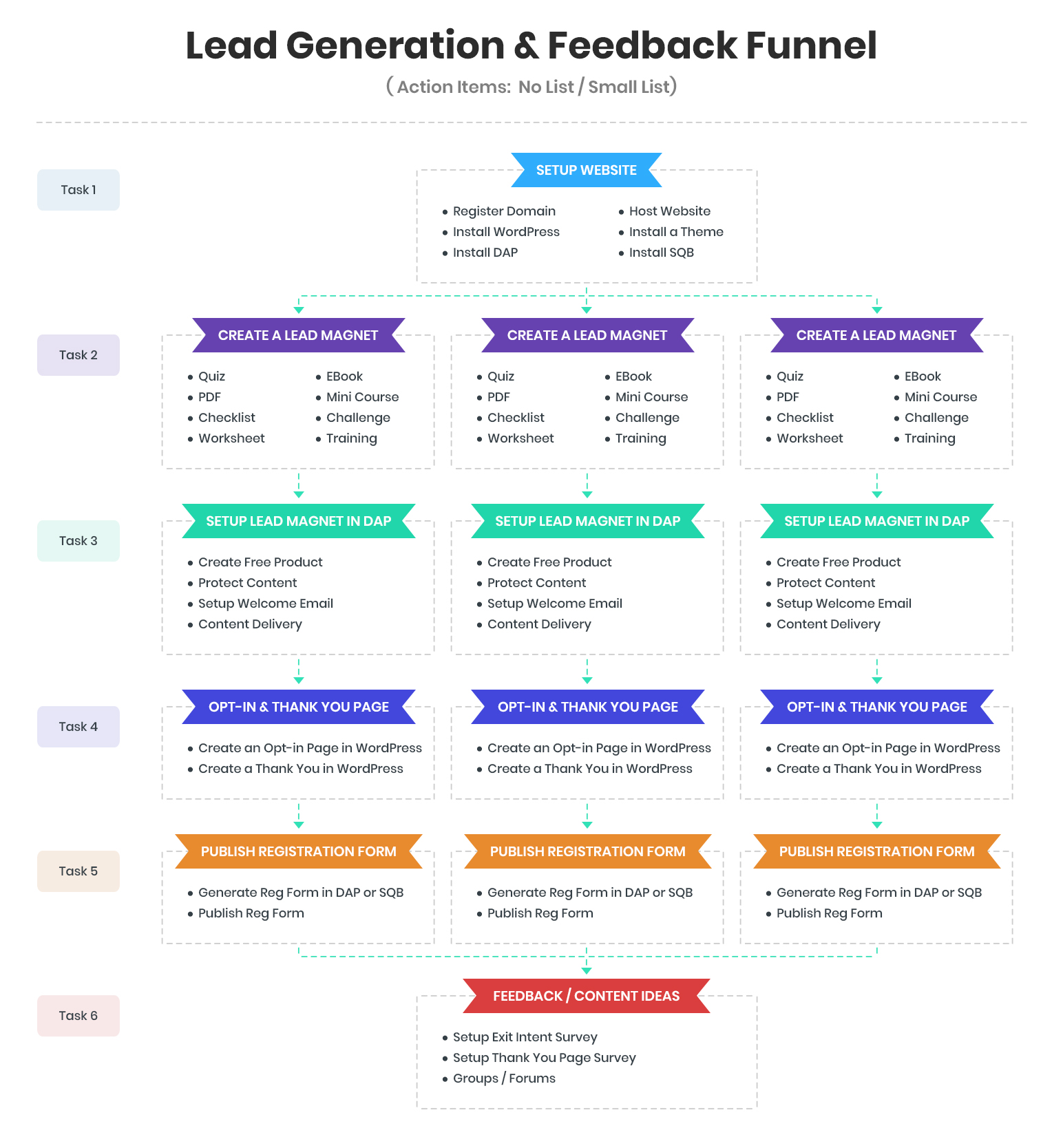
In this phase, you need to work on building out a full-fledged lead generation and feedback funnel!
What is a lead generation and feedback funnel, how do you build it and how can you automate it?
You'll find all the answers in the video above.
☑️ Customer Conversion Phase ( 300-1000 people on your list )
You are in this phase if you have 300-1000 people on your list.
You need actively work on converting qualified leads into customers through a customer conversion funnel.
☑️ Monetization Phase